Astro Panel 2027 is the most advanced Photoshop ecosystem ever created for landscape and astrophotography.

Powered by the revolutionary RAW Fusion Engine™, it combines Photoshop, advanced image processing, and Hybrid UXP technology into a single seamless workflow.

Edit faster. Stack smarter. Create without limits.

AVAILABLE NOW

RAW Fusion Engine™ Inside
The world's first Hybrid UXP Architecture for Photoshop.

MORE THAN 40,000 SATISFIED CLIENTS
⭐⭐⭐⭐⭐

What's New in Astro Panel 2027

Compared to Astro Panel X 2026

Automatic Fusion Sky Stack
Launch image stacking directly from the panel — no terminal commands and no manual Fusion Bridge selection required.


Dedicated Runtime Environment

Separate installers for macOS (.pkg) and Windows (.exe) provide a seamless, ready-to-use setup experience.


Enhanced Sky Stack Module

Dedicated loading sections for Lights, Darks, Bias, and Flats, including file counters, reset controls, and metadata preview panels.


N-HDR

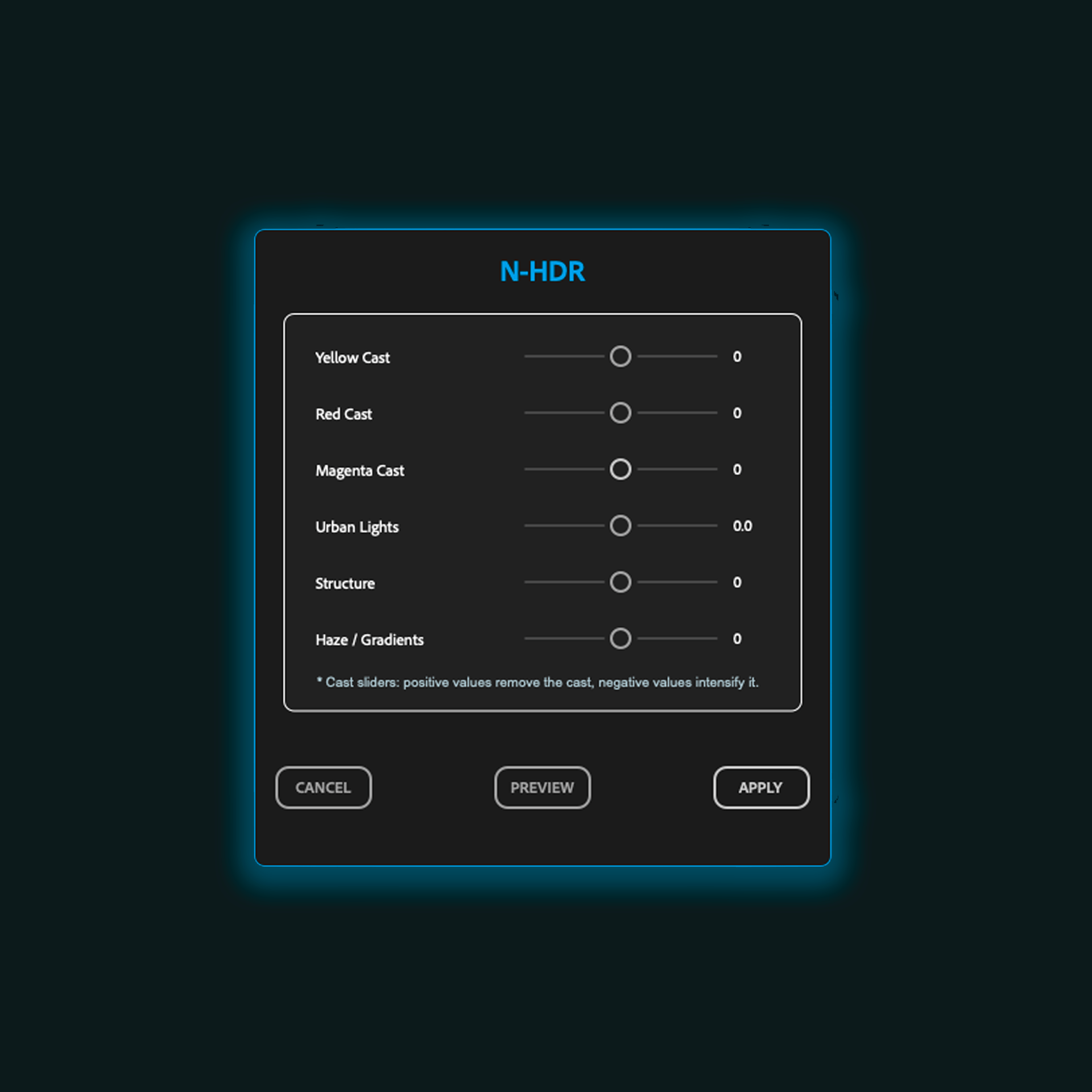
A brand-new module designed for urban nightscape photography, featuring advanced controls for color cast correction, haze reduction, structure enhancement, highlight recovery, and urban light management.


Magic Light Pro

A completely redesigned light enhancement module with advanced controls for layer opacity, midtone mask opacity, blur intensity, and feathering.


Finalize

New finishing module featuring advanced sliders for exposure adjustment, intelligent saturation enhancement, and Super Contrast.


Basic Adjustments

A brand-new quick-edit module for essential image corrections and workflow acceleration.


HSL Module

Integrated into the interface with a COMING SOON ribbon, preparing the foundation for future color management tools.


Updated 2027 Interface

Powered by APX2027 v11.0.2, featuring a refined UI, dedicated Language and Theme controls, and a cleaner workflow experience.


Improved Customer Experience

Simplified installation process with multilingual (EN/IT) documentation included. Install Astro Panel first, then install the Fusion Runtime for a smooth setup.

Astro Panel 2027 introduces true workflow automation, a fully integrated stacking environment, powerful new professional editing modules, and a significantly more polished, customer-friendly installation and user experience.

From image acquisition to final enhancement, Astro Panel 2027 delivers a faster, smarter, and more complete Photoshop workflow than ever before.

Why photographers are switching to Astro Panel 2027

Same RAW files. Better result. Less work.

LOAD YOUR FILES

Import your RAW files.

CLICK START

No complicated settings.

EDIT

Open directly inside Photoshop.

Subscribe and Access All Benefits​

Don’t miss this unique opportunity

Subscribe now and enjoy lifetime benefits!

Buy one of this plan and download every product do you want from our store.

Lifetime

Unlimited Downloads
299 Lifetime
  • Access to all products actual and future
  • 15 Extra License Keys
  • Priority Email Support
BEST VALUE

Or you can buy our products with One Time Purchase

Astro Panel 2027

Single Purchase
99
59,90
  • One License Key
  • Three Devices
  • Fusion Integrated in Astro Panel 2027
  • Plugin for Adobe PS CC
  • UXP Hybrid Plugin
  • New Product
Popular

Educational Bundle 2027

Single Purchase
129
79,90
  • Three License Key
  • Astro Panel 2027
  • Fusion Integrated in Astro Panel 2027
  • Astro Background Extractor 2026
  • How to Photograph Night Sky 2026
  • Access to Basic Course
Most Loved

Complete Bundle 2027

Single Purchase
199
99,90
  • Five License Key
  • Astro Panel 2027
  • Fusion Lab Beta 2026
  • Astro Background Extractor 2026
  • How to Photograph Night Sky 2026
  • Access to Advanced Course
Smart Choice

No Photoshop?

Use Fusion Lab 2026.

Same RAW Fusion Engine.Same stacking quality.Standalone application.

Background Extractor

Single Purchase
59
29,90
  • One License Key
  • Three Devices
  • Standalone App
Popular

Fusion Lab Beta 2026

Single Purchase
99
49,90
  • One License Key
  • Three Devices
  • Standalone App
Popular

BUILT FOR ASTROPHOTOGRAPHY AND MORE

Automatically or step by step change all the images of the milky way, deep sky or startrail. 

With the tools available you can enhance any detail, remove the stars in deep sky images or enhance the colors of your startrails.

INTUITIVE MASK SELECTION

Astro Panel 2027 represents a Revolution in photo editing, suitable for astrophotography as well, where artificial intelligence collaborates with the photographer to achieve astonishing results.

Thanks to its advanced technology, Astro Panel 2027 assists the photographer in refining brightness and tonality masks with unprecedented precision, particularly useful in capturing and processing landscape and  astronomical images.

This tool allows for exceptional results while maintaining creative control in the hands of the photographer, whose style and vision remain essential for the success of the final work.

MILKY WAY

Astro Panel 2027 is a sophisticated ally in photo editing, but it goes beyond: it’s your key to explore the universe of Milky Way photography. 

With its cutting-edge technology, Astro Panel 2027 adapts to the unique needs of this art form, offering you precise and powerful control over brightness and tonality masks.

It’s your ideal companion for capturing and processing breathtaking Milky Way images, allowing you to express your creativity without limits.

RAW FUSION ENGINE

Powered by the revolutionary RAW Fusion Engine™, Astro Panel 2027 introduces a new generation of Hybrid UXP Processing for Photoshop.

Create stunning Long Exposures, Star Trails, Milky Way Stacks, Deep-Sky Images, Focus Stacks, Night & HDR Blends, and Panoramas — all from a single integrated workflow.

Advanced calibration, alignment, stacking, and image processing are now seamlessly connected to Photoshop through the world’s first Hybrid UXP Architecture.

N-HDR

Step into a new era of night photography with N-HDR, the exclusive innovation of Astro Panel 2027, designed specifically for your night cityscapes


NIGHT HIGH DYNAMIC RANGE represents advanced technology that seamlessly combines automation and precision to create breathtaking images, capturing every detail and nuance of light even in the most challenging conditions.

MASTER OF THE LIGHT

When the lights and shadows become difficult to handle, the Masks section comes in handy.

This section is able to guarantee a rapid and constant workflow, allows you to select in real time all luminosity masks and is able to select all the highlights, shadows and midtones of the main colors.

MICROMETRIC CONTROL

One of the strengths of Astro Panel 2027 is the simplicity and speed of the digital processing procedure that in a very short time and few clicks will make your photos better and more detailed.

CLEAN IMAGES

Your images have never been so clean and contrasted. You can manage in Astro Panel 2027 the elimination of the annoying gradient or the haze to highlight hidden details of your images.

Intelligence meets Creativity.

RAW Fusion Engine™ is the core of Astro Panel 2027.

Built on the world's first Hybrid UXP Plugin Architecture, it brings advanced calibration, alignment, stacking, and computational imaging directly into Photoshop.

Process Milky Way, Deep-Sky, Long Exposure, HDR, Panorama, Focus Stacking, and Star Trail projects faster than ever, while staying inside a single seamless workflow.

One Plugin. One Ecosystem. One Engine. Endless Possibilities.

Photography Tools

This module focuses on post-processing landscape and general photography.
It has undergone a complete revamp, offering functions suitable for various types of photography.
With just a single click, you can adjust white balance, color tone, remove digital noise and hot pixels, enhance image sharpness, recover shadows and highlights, and apply effects such as Orton, Glow, and Dodge and Burn.

Astro Tools

This module is dedicated to post-processing astronomical images. The Astro section has been redesigned for 2027 and streamlined with new features to accelerate the workflow for astro-based images, including Milky Way, Startrail, and Deep Sky photography.

Fusion Tools

RAW Fusion Engine™ is the next generation of image stacking and fusion technology integrated into Astro Panel 2027.

Built specifically for photographers and astrophotographers, it allows you to combine multiple RAW files to produce cleaner, sharper, and more detailed images. Create silky-smooth long exposures, reduce noise through advanced stacking algorithms, merge multiple exposures for HDR and Night HDR photography, and generate ultra-high-quality panoramas with ease.

For astrophotography, RAW Fusion Engine™ enables advanced calibration and stacking workflows designed to reveal more detail in the Milky Way, star fields, nebulae, and deep-sky objects while preserving natural colors and maximizing signal-to-noise ratio.

Powered by a dedicated Hybrid UXP architecture, RAW Fusion Engine™ delivers faster processing, improved image quality, and a seamless workflow directly inside the Astro Panel ecosystem.

Export 

Seamlessly prepare your images for web with our resizing and watermarking tools. Optimize your pictures for the perfect display, whether online or in printed materials, to ensure they always look their best.
Our web resizing tool allows you to efficiently decrease file sizes for quicker online uploads, maintaining the sharpness and clarity of your images.
Secure your work by embedding a personalized watermark, incorporating your logo or signature text in a subtle yet secure way, ensuring your images remain identifiable and protected no matter where they are displayed.

Modal Magic Just Got Bigger
18 Professional Modals

Astro Panel 2027 transforms Photoshop into a complete editing ecosystem through a new generation of beautifully designed, high-performance modal workspaces.

From Basic Adjustments, Magic Light Pro, N-HDR, Dodge & Burn Pro, Vignette, Recovery, Kill Pollution, Color & Cast, Orton Effect, and Glow, every tool opens in its own dedicated environment, offering intuitive controls, real-time adjustments, and professional-grade precision.

Each modal has been redesigned from the ground up to deliver a faster, smoother, and more immersive editing experience, giving photographers complete creative freedom without interrupting their workflow.

And we're only getting started. Astro Panel 2027 introduces a fully modular architecture designed to grow with future updates, bringing even more powerful tools and innovative workflows to photographers around the world.

Edit faster. Create smarter. Experience the future of Photoshop editing.

Basic Adjustments
It's one of the new modal windows in Astro Panel 2027, created to give photographers a clean and powerful starting point for image correction. From exposure and contrast to highlights, shadows, whites, blacks, temperature, tint, vibrance, and saturation, every essential adjustment is available in one compact and intuitive panel. It is the perfect first step to balance the image, recover details, refine colors, and prepare the photo for advanced editing.
Color & cast
This panel provides advanced color correction tools, allowing users to adjust shadows, midtones, and highlights with separate sliders for cyan, magenta, yellow, and RGB (red, green, blue) channels. Additionally, it includes options to correct color balance with an active white balance toggle, as well as sliders for vibrance and saturation adjustments. An RGB Cast section enables direct control over red, green, and blue levels. 
Remove Defects
The Remove Artifacts tool is designed to eliminate unwanted visual distortions, such as haze and chromatic aberrations, from your images. The haze slider helps reduce the mist or fog that can obscure details, enhancing clarity and contrast. The chromatic aberration slider addresses color fringing, a distortion often visible along the edges of objects in high-contrast areas, ensuring sharper, more accurate colors. 
Remove Noise
This panel is focused on noise reduction, offering sliders for strength, details, color noise, and sharpening. A checkbox option for removing JPEG artifacts is available for further refinement, especially useful for compressed images.
Remove Hot Pixel
This modal is designed to address and remove hot pixels in images. It includes sliders to adjust the radius, threshold, and blur intensity, allowing users to finely control the removal process. The “Reset Slider” button lets users revert settings to their default values, and “Preview” and “Apply” buttons provide an easy workflow to inspect changes before finalizing them.
Recovery
Recover highlights, midtones, and shadows with precision. This modal gives you full control over the dynamic range of your photo, helping you bring back lost detail and balance the exposure across your image. Perfect for high-contrast scenes, night landscapes, and overexposed skies.
Sharpness
The Sharpen Mask tool applies an unsharp mask effect, commonly used to improve the sharpness and detail of an image. The Amount slider controls the intensity of the sharpening effect, making edges more defined and enhancing fine details. The Radius slider sets the size of the area around edges that will be sharpened; a lower radius targets fine edges, while a higher radius affects larger details. The Threshold slider determines the level of contrast required to apply sharpening, allowing you to focus the effect on high-contrast areas while leaving smoother areas untouched.
N-HDR
A powerful new module created specifically for urban nightscape photography. Recover highlights, eliminate unwanted color casts, reduce atmospheric haze, enhance structure and detail, and intelligently manage city lights to reveal cleaner, more balanced, and visually striking nighttime images. Perfect for city skylines, illuminated landmarks, and urban scenes captured after dark.
Orton Effect
The Orton window offers a rich selection of customization options for both darks and lights, allowing you to fine-tune your image with incredible precision. The sliders include controls for Depth, Radius, and Contrast, which are available for both dark and light areas. Additionally, you can adjust the RGB channels separately, giving you complete creative freedom to balance the colors in both dark and light sections. With Reset buttons for quick adjustments and preview options to see your edits in real-time, this tool is perfect for creating that signature Orton glow effect on your photos.
Glow Effect
The Glow window provides easy-to-use sliders for controlling Depth, Radius, and Contrast, letting you quickly add a stunning glow effect to your images. The interface is sleek and simple, featuring customizable sliders for each of the three controls, as well as RGB sliders to tweak color balance. A Reset button allows you to revert changes effortlessly, while the Preview and Apply buttons let you see the changes as they happen. This tool is perfect for those who want to add a soft, glowing touch to their photos while maintaining full control over the color tones.
Dodge & Burn
Shape light and shadow with precision. Adjust highlights and dark areas independently using Lights 1 & 2 and Darks 1 & 2. Enhance depth, reveal details, and direct attention exactly where you want it. A fast, non-destructive workflow with real-time preview for professional results in just a few clicks.
Saturation Masks
This modal window is designed for managing saturation masks in the RGB color channels. Each column allows adjustments to the saturation of Red, Green, and Blue masks, providing control over lights, midtones, and darks through dedicated sliders. Each level of saturation can be individually disabled, and settings can be quickly reset. At the bottom, the RGB saturation sliders allow precise control over the overall saturation of each channel, with options to completely disable the color masks if needed.
Vignette
Draw attention exactly where it belongs.The Vignette module creates a smooth, natural edge darkening effect that enhances depth, mood, and visual impact. Adjust the intensity with a single slider and preview the result in real time.Simple, elegant, and effective for any style of photography.
Finalize
The final touch for a perfect image.Fine-tune exposure, enhance colors with Advanced Saturation, and add depth with Super Contrast. Designed to bring everything together and give your image the finishing polish it deserves.Fast, powerful, and ready for your final export.
Magic Light Pro
Create stunning light effects with complete control.Magic Light Pro lets you fine-tune light intensity, midtone mask strength, and feather softness to achieve a natural, realistic glow. Shape the atmosphere, enhance depth, and direct attention exactly where you want it.Professional lighting effects made simple, precise, and fully non-destructive.
Kill Gradient
The Kill Gradient window is specifically designed to remove unwanted gradients from your photos with just a few clicks. It features two main sliders: Depth and Radius, allowing you to fine-tune how aggressively the gradient is removed. The intuitive interface makes it incredibly easy to reset changes with a single click, and the real-time Preview button ensures that you can view your adjustments before applying them. This tool is ideal for photographers looking to eliminate harsh gradients and achieve a more balanced, natural look in their images.
Kill Pollution
Remove unwanted glow and color noise from your skies. Kill Pollution lets you recover depth and clarity in night images affected by light pollution. With just two simple sliders — Depth and Color — you can fine-tune the balance of your shot, preserving stars and contrast. Optionally apply a layer mask for even more control. Clean skies, no compromise.
Liquify Startrail
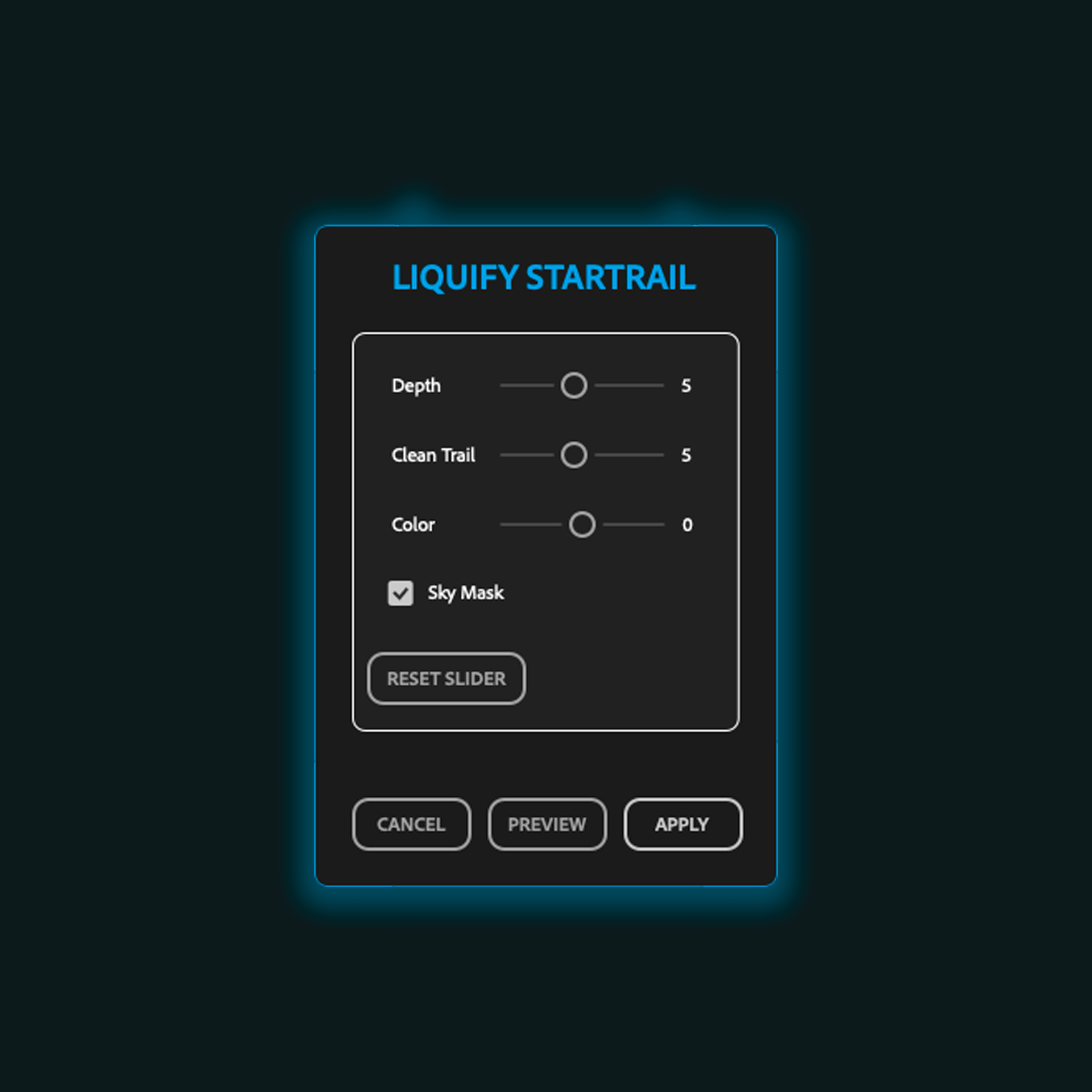
Transform your star trails with creative control.Adjust trail depth, clean unwanted artifacts, and enhance colors while preserving the natural beauty of the night sky. The integrated Sky Mask protects the landscape, allowing precise adjustments only where they matter.Create cleaner, smoother, and more dramatic star trails in seconds.
Previous
Next

Video Tutorial Online

Dive into YouTube tutorials to unlock a world of knowledge.
From beginners to pros, there's a guide for every skill level and interest.
Subscribe, engage, and embark on a learning journey
that transforms curiosity into mastery.
Enjoy this endless resource of expertise and inspiration at your fingertips.

ASTRO PANEL 2027

Astro Panel 2027 is only compatible with Adobe Photoshop CC from 2022 to 2027 version on Windows, Mac Intel and Mac Apple Silicon M1-M2-M3-M4-M5.

Orders for incorrect purchases will not be refunded. 

Make sure you have installed one of the Adobe Photoshop CC versions before purchasing.

ASTRO PANEL  2027

Astro Panel 2027 introduces exciting new features, including modal windows for intuitive, customizable controls and the ability to activate the software on up to 3 devices. These updates make photo editing even more accessible, whether you’re a professional or a beginner, providing precise adjustments with sliders for tools like Orton, Glow, Kill Gradient, and more.

Choose Astro Panel for its powerful editing capabilities, designed specifically for landscape and astrophotography, and join over 40,000 satisfied clients.

    Contact Us

    Fill out the form below and we will get back to you as soon as possible.